Routing and screens
Public navigation helpers change the route, the router resolves a registered
RouteDef, and the selected factory supplies the view body. Route metadata
keeps construction, chrome, wrappers, and resize behavior separate from
screen business logic.
Symbol-level registration is in Routing. Day-to-day calls are in the Navigation guide. To add a route, use Adding a screen.
Routing flow
flowchart TD
    Action[Screen or drawer action] --> Navigation[Navigation helpers]
    Navigation --> Router[Router]
    Router --> RouteDef[Route definition]
    RouteDef --> Factory[Screen build factory]
    RouteDef --> Chrome[Shell chrome]
    Factory --> Wrapper[Body wrapper]
    Wrapper --> View[Flet view]
    Chrome --> View
The flow is:
- A screen or drawer calls a public helper from
ui/navigation.py. - The router resolves the matching
RouteDefinROUTE_REGISTRY. - The route's build factory returns raw screen controls.
- The router applies the configured body wrapper and, for Shell routes, shared chrome.
- The result is added to the page as an
ft.View.
If a build factory returns None, the router builds the route's
fallback_path, or Home when no fallback is configured, and syncs the page
URL to that fallback. Factories for learn, session, and existing-set edit also
return None when the set CSV is missing (for example after delete + browser
Back). Edit with create-set query params (title) also returns None when
that CSV already exists, so browser history cannot re-open a create flow that
would duplicate the catalog entry. This keeps incomplete or stale deep links
out of the view stack.
Two navigation roles
The application needs two different forms of navigation:
- Main destinations, such as Home and Settings, replace the current main screen.
- Focused tasks, such as creating or editing a set, open temporarily above the current view and return to the previous view when the task is finished.
This project calls these roles Shell and Deep. They are project
terminology, not special screen types required by Flet. In code they are
represented by RouteKind.SHELL and RouteKind.DEEP.
Shell: a main destination
A Shell route is part of the application's main navigation:
- open it with
navigate_to(), - it replaces the current view stack,
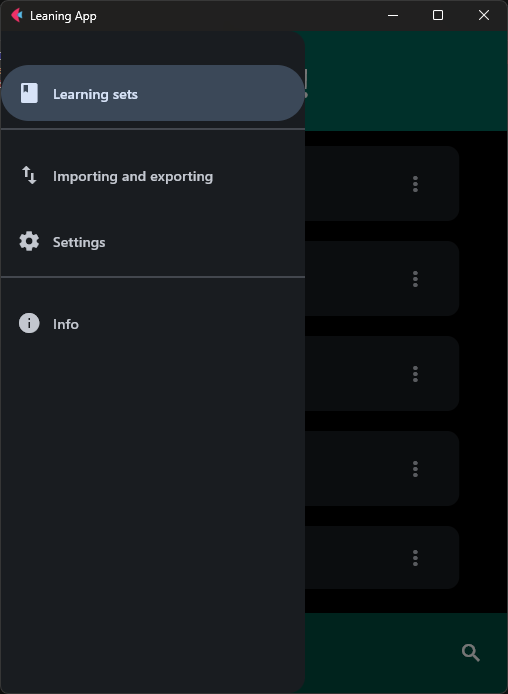
- it may appear in the navigation drawer,
- it uses the shared application chrome, configured per route.
Shared chrome can include the AppBar, drawer, bottom bar, floating action button, and search button. A route does not need to display every element. Home, Import/Export, Settings, and Info are Shell routes.
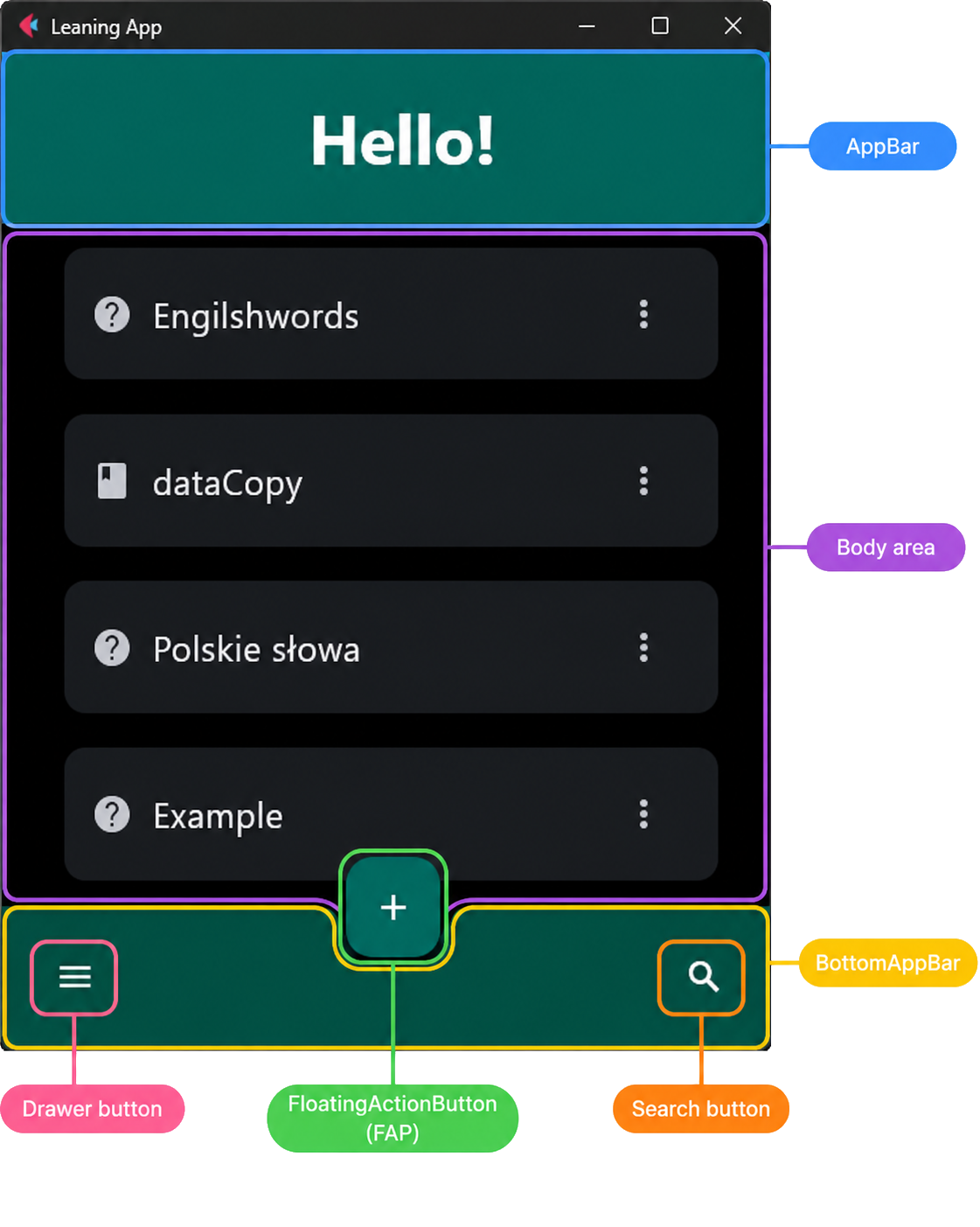
The drawer lists Shell destinations registered with drawer_label /
drawer_icon:
Deep: a focused task
A Deep route represents a task started from another screen:
- open it with
push_view(), - it is added above the current view,
- the previous Shell or Deep view remains available underneath,
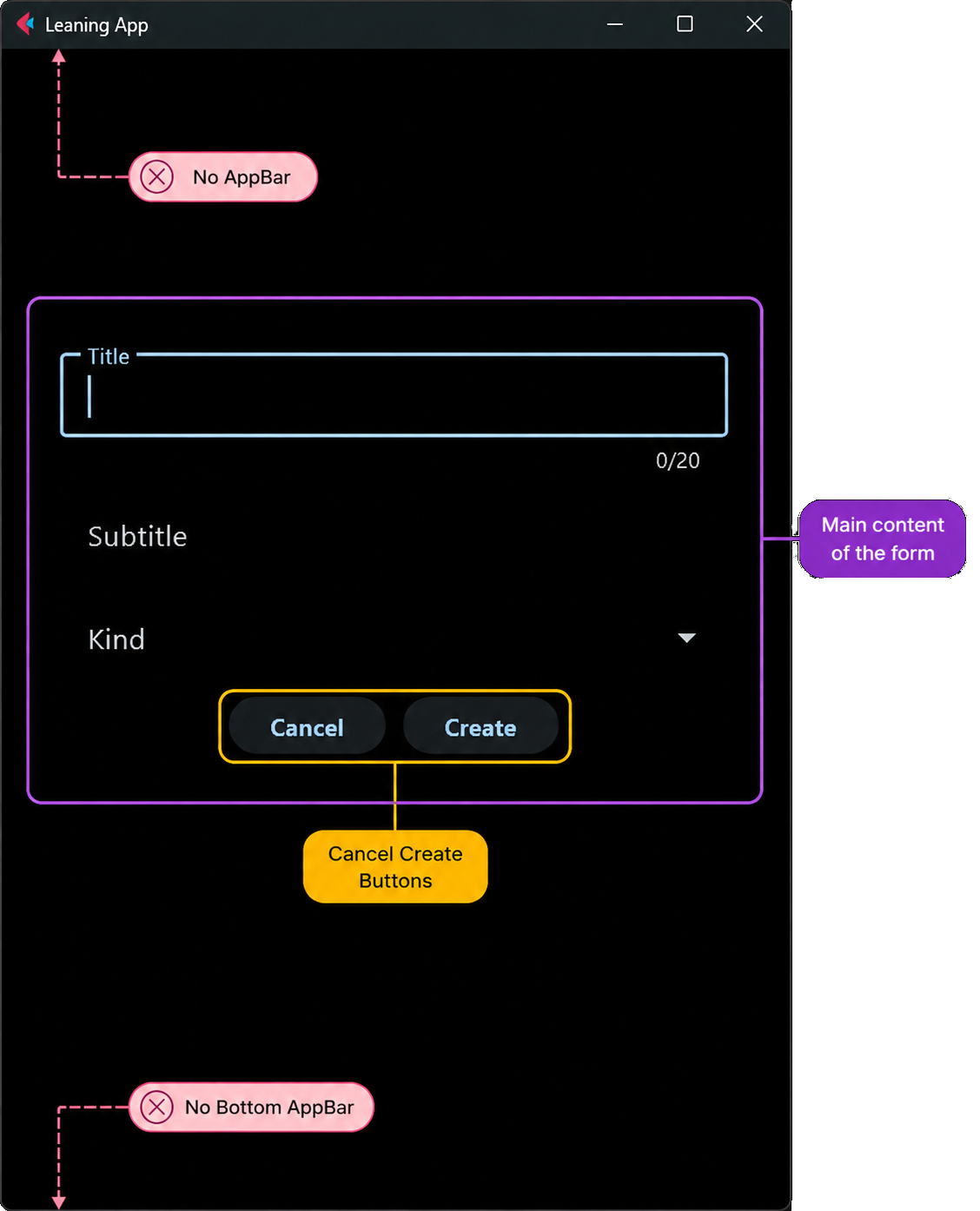
- it hides shared chrome,
- finish or cancel it with
go_back()to reveal the previous view.
Create, Edit, and Learn are Deep routes. Create opens Edit with push_view().
After the first Save, reanchor_edit_on_home() rebuilds the stack as Home →
Edit so Back returns to a fresh catalog instead of the create form. See
Navigation.
Why the distinction exists
RouteKind gives the router enough information to choose whether navigation
should replace the main destination or push a temporary view. The same choice
also determines whether shared chrome is attached and what the Back action
should reveal.
flowchart TD
    Home["Home (Shell)"] -->|"push_view"| Create["Create set (Deep)"]
    Create -->|"go_back"| Home
    Home -->|"navigate_to"| Settings["Settings (Shell)"]
The chrome and body-wrapper layers (including live AppChrome / AppDrawer)
are described in Chrome and wrappers.
Screen map
Paths are constants in ui/route_paths.py. Factories and RouteDef entries
live in ui/route_registry.py. Home has no dedicated screen class: the factory
builds a TilesContainer and registers it with
Body registry.
| Path | Kind | Class / body | Role |
|---|---|---|---|
/ |
Shell | TilesContainer |
Learning-set list (Home) |
/import-export |
Shell | ImportExportControl |
Import CSV and export tiles |
/settings |
Shell | SettingsControl |
Defaults (restore page settings to their original values), Appearance, text to speech, learn-queue retry, and demo-set install (Theming, Text to speech, Learning, Demo sets) |
/info |
Shell | InfoControl |
In-app product information |
/create-set |
Deep | CreateSetMenu |
Create an empty set, then open edit |
/set/edit |
Deep | EditSetMenu |
Edit cards for one set |
/set/settings |
Deep | SetSettingsMenu |
One set's learning and speech overrides (Per-set settings) |
/set/learn |
Deep | WordFields or WordDefinitionField (session=False) |
Learn menu / word list |
/set/learn/session |
Deep | Same control (session=True) |
Active learn session |
Search is not a route: go_search() hosts SearchControl in the shared
AppBar over the Home or export TilesContainer (see
Body registry).
Learn: menu then session
Learn is two Deep routes over the same control family:
/set/learnopens the menu (session=False) with progress and word list.- Starting practice navigates to
/set/learn/session(session=True), which runs theAppDataqueue described in Learning algorithm.
The factory picks WordFields or WordDefinitionField from the set file
suffix (_words.csv vs _definitions.csv).
Related tasks
| Task | Doc |
|---|---|
| Register a new route | Adding a screen |
| Call navigation helpers | Navigation |
| Import / export screen behavior | Import and export |
| Search and shared tiles | Body registry |
| Component building blocks | UI components |