Chrome and wrappers
Chrome and body wrappers solve different layout problems. Chrome is the shared application frame around a Shell screen. A wrapper is the container around route controls inside the available view body.
They are separate parts of the routed view:
flowchart TD
    View[Flet View] --> Chrome[Shared Shell chrome]
    View --> Wrapper[Body wrapper]
    Wrapper --> Body[Screen controls]
Chrome is attached through ft.View properties such as appbar, drawer,
bottom_appbar, and floating_action_button. The wrapper is the root control
inside ft.View.controls; it contains the screen body.
Config vs runtime
Two layers work together:
| Layer | Module | Role |
|---|---|---|
| Declarative config | ui/chrome_config.py |
Per-route ShellChromeConfig in SHELL_CHROME (titles, visibility flags). |
| Live registry | ui/app_chrome.py |
AppChrome holds the real AppBar / bottom bar / FAB / drawer instances. |
| Drawer UI | ui/app_drawer.py |
AppDrawer builds tiles and navigates on selection. |
SHELL_CHROME answers what should this Shell route look like. AppChrome
answers where are the shared controls so the router can mutate them. Startup
creates the controls once, registers them, then the router applies config from
SHELL_CHROME[path] on each Shell (or Deep) transition. Existing RouteDef
entries also store chrome=SHELL_CHROME[…] for registry consistency, but the
router does not read route_def.chrome — path lookup in SHELL_CHROME is the
runtime source of truth.
Shell chrome
ui/chrome_config.py contains the per-route SHELL_CHROME
configuration. It controls the AppBar title and menu button, bottom bar,
floating action button, and search button. Deep routes have no shared chrome.
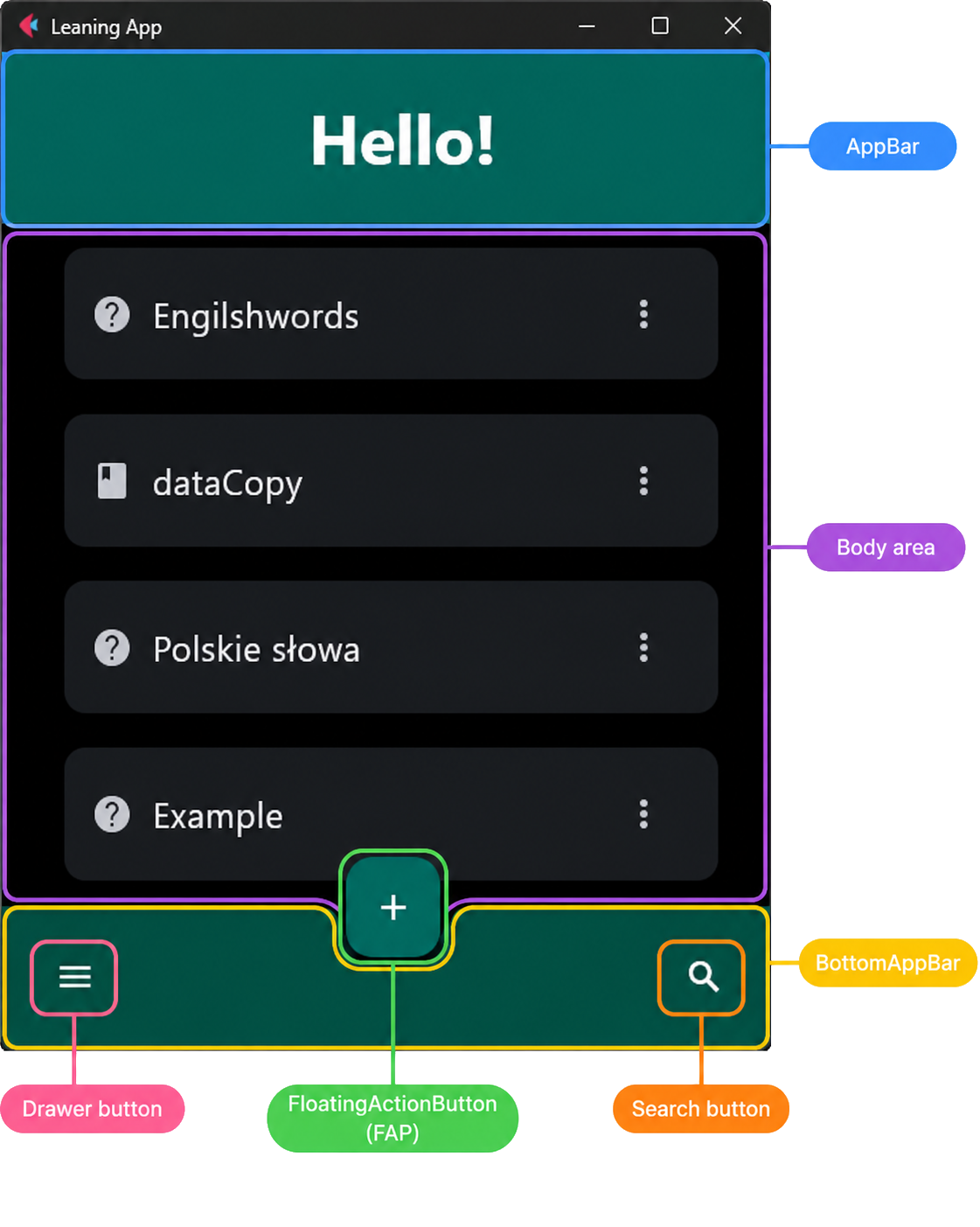
A typical Shell route such as Home shows the full chrome around the body:
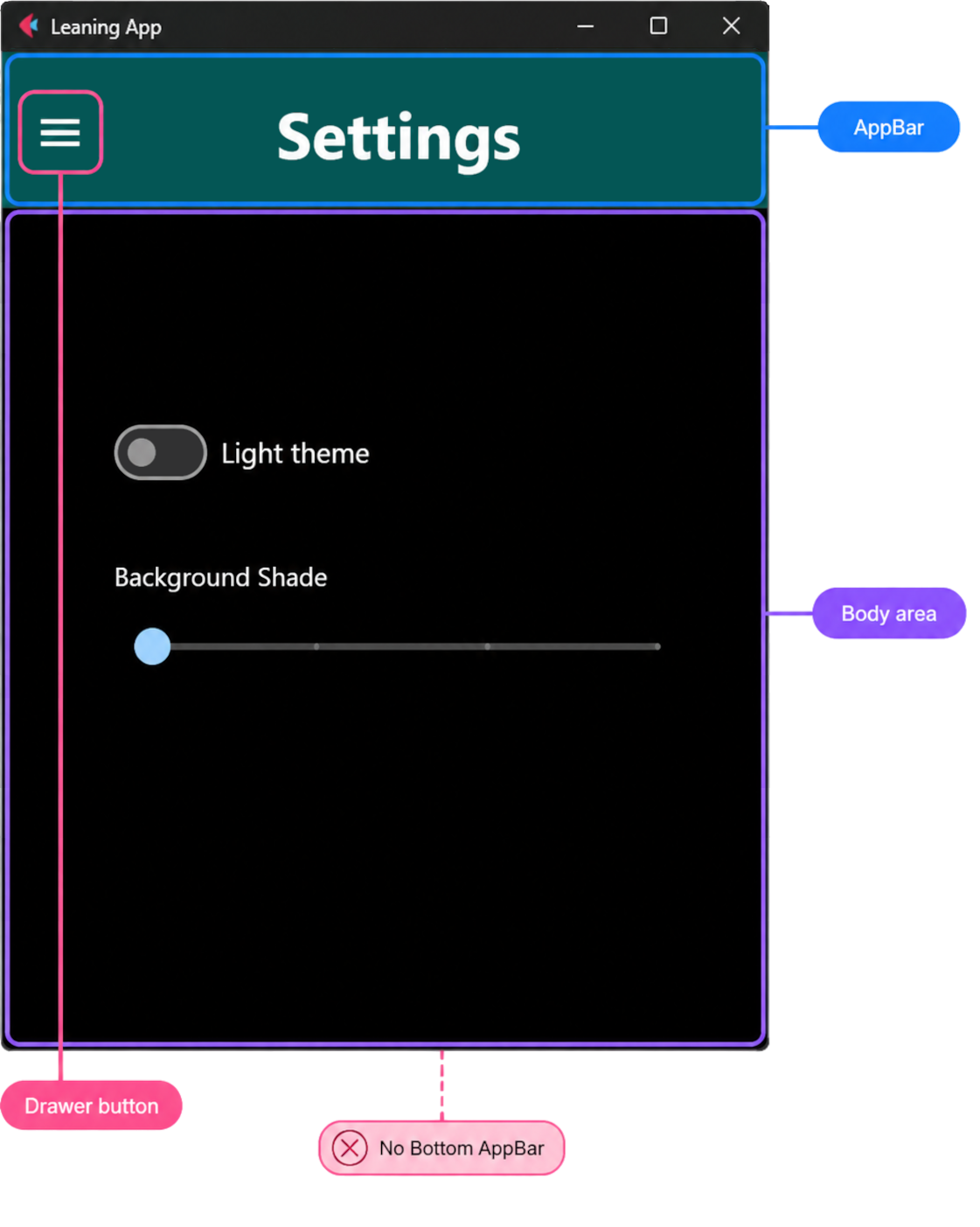
Settings demonstrates reduced Shell chrome: it retains the AppBar while hiding the bottom bar, search button, and floating action button.
SHELL_CHROME = {
    # ...
    SETTINGS_ROUTE: ShellChromeConfig(
        appbar_title="Settings",
        appbar_menu_leading=True,
        bottom_appbar_visible=False,
        fab_visible=False,
        search_button_visible=False,
    ),
}
See the routing and screens overview for the Shell and Deep screen forms.
Runtime: AppChrome
AppChrome in ui/app_chrome.py is a process-wide registry of the shared
chrome controls built in app.py. After construction:
AppChrome.set_drawer(drawer)
AppChrome.register(
    appbar=page.appbar,
    bottom_appbar=page.bottom_appbar,
    floating_action_button=page.floating_action_button,
    ...
)
The router then:
- Looks up
SHELL_CHROME[path]for Shell routes and sets visibility, restores the AppBar titleTextwithAppChrome.show_appbar_title(including the__greeting__sentinel, after in-place search may have replacedappbar.title), leading menu button, and FAB. - Hides AppBar, bottom bar, and FAB for Deep routes.
- Attaches the same registered controls onto each Shell
ft.View(plus drawer and alignment defaults fromAppChrome). - Updates
AppChrome.get_drawer().selected_indexso the drawer highlights the active Shell destination.
Layout metrics also read AppBar / bottom-bar heights through AppChrome when
computing available body space. AppSession disable/enable navigation toggles
the drawer via has_drawer / get_drawer.
Register before the first Shell view is built; see Startup. Do not recreate AppBar or FAB per route — mutate the registered instances.
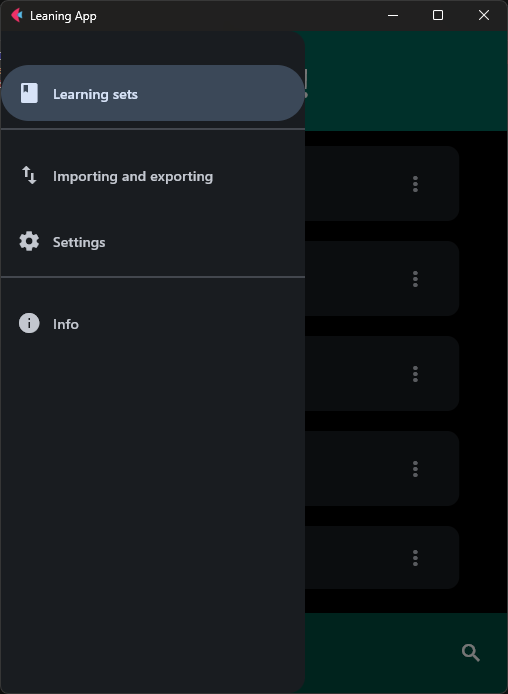
Runtime: AppDrawer
AppDrawer in ui/app_drawer.py subclasses ft.NavigationDrawer. Tiles come
from build_drawer_controls() / DRAWER_ROUTES in ui/route_registry.py.
On change it closes the drawer and calls navigate_to_async unless the
selected route is already current, or navigation is locked in AppSession.
The drawer is assigned to page.drawer and registered with
AppChrome.set_drawer so Shell views and chrome sync share one instance.
Body wrappers
Wrappers in ui/layout_host.py centralize sizing, padding, and
safe-area behavior. The router chooses one from RouteDef.body_wrapper;
screen factories return only their raw controls.
| Wrapper | Helper | Typical routes |
|---|---|---|
BodyWrapperKind.SHELL |
build_shell_body |
Home, Import/Export |
BodyWrapperKind.BOTTOM_INSET_SHELL |
build_bottom_inset_shell_body |
Settings, Info |
BodyWrapperKind.DEEP |
build_deep_body |
Create, Edit, Learn |
SHELL provides the normal expanding body area. BOTTOM_INSET_SHELL adds
safe-area handling for Shell screens that have an AppBar but no bottom bar.
DEEP provides full-screen form sizing and vertical padding.
Why Settings needs a different wrapper
The Settings chrome configuration hides the bottom app bar but keeps the
AppBar. Its route therefore uses
BodyWrapperKind.BOTTOM_INSET_SHELL, which wraps the normal Shell body in
ft.SafeArea.
On a phone, route content can otherwise overlap:
- the status bar, camera cutout, or notch at the top,
- rounded screen edges,
- the gesture area or Back, Home, and Recent apps controls at the bottom.
For Settings, the AppBar already owns the top inset. The wrapper therefore
uses avoid_intrusions_top=False while retaining protection on the sides and
bottom:
Home and Import/Export use BodyWrapperKind.SHELL because their shared chrome
already defines the normal Shell body area. In-place search keeps the AppBar
visible and hosts SearchControl as its title (hiding the menu button, bottom
bar, and FAB); it does not use a separate body-wrapper kind or a search-only
ft.SafeArea. The Deep form wrapper supplies form width and vertical padding;
it does not add an ft.SafeArea.
Keeping these decisions in wrapper helpers prevents individual screens from reimplementing route-frame calculations.
See the Chrome configuration API, App chrome API, App drawer API, and Layout host API for generated field and helper contracts.